What is a Travel Wrapped? How to make your own (free)
By Aditya Sharma, founder of Miles · Updated · 5 min read
Every December, people share the music that defined their year. Travel deserves the same treatment. A year of trips is a story, but most of us tell it with a photo dump that nobody scrolls to the end of. A Travel Wrapped tells it in numbers and on a map, in a format people already know how to read.
What goes into a Travel Wrapped
The best wrapped recaps answer the questions your friends would ask. On a Miles Travel Wrapped card, those are:
- Total distance, in kilometres or miles, with how far around the world that is. 15,000 km is about 38% of the Earth’s circumference. To work it out by hand, see how far have I flown.
- Places and countries: every city you stopped in and every country, counted once. Not sure whether a transit counts? Here is how to count the countries you have visited.
- Time on the move: hours in the air, on trains and on the road.
- Your longest journey, like Rome to Delhi, with its distance.
- Your favourite way to travel: plane, train, car, bus or ferry.
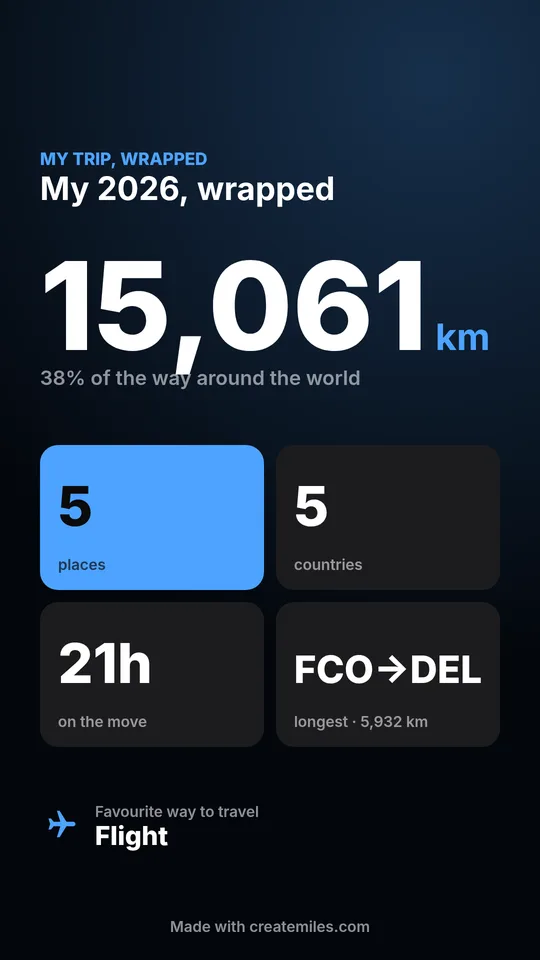
The card is the still version. The video is where it comes alive: your route draws itself across a 3D globe, one stop at a time, with each city revealed only as the trip heads there. Viewers find out where you went as it plays, which is exactly what keeps them watching to the end.
How to make your Travel Wrapped
- Open the editor at createmiles.com/create. It works in your phone’s browser, with nothing to install.
- Add your stops in order. Type airport codes like
DEL DXB LHR, or city names like Goa, Hampi or Kyoto. For a whole year, add every trip as one route. Each journey can be a flight, train, car, bus or ferry. - Pick a look. Satellite shows a 3D globe with real imagery; the flat looks are cleaner. The video and the cards always match.
- Press Make the video. It takes about a minute. Your wrapped card, a boarding pass card and a globe poster are ready in the Share tab at the same time.
Don’t want to type a year of trips? If you use an AI assistant that can read your email, such as ChatGPT or Claude, ask it to find your trips and make a Miles video. It sends Miles the route; Miles itself never sees your inbox.
Ideas for your wrapped
- Your year in travel. Every trip from January to December as one route. Post it in December next to your Spotify Wrapped, or cut it into a longer edit with this travel recap video template.
- One big trip. A honeymoon, a Europe summer or a backpacking route, wrapped the week you get home.
- A friend group or family trip. Make one video and send everyone the link; it plays in any browser.
- Your lifetime of travel. Add every country you’ve been to and see how many times around the world you’ve gone.
Where to post it
The video is made for vertical feeds: Instagram Reels, TikTok and YouTube Shorts in 9:16, or 4:5 for a feed post. The wrapped card is sized for Stories, and the boarding pass card works well as a carousel slide after the video. Add a trending sound when you post; the video itself has no music, so it fits any track.
For timing, December is when wrapped content is everywhere and people are in the mood to compare. But a trip wrapped works any time a trip ends, while everyone still remembers you were away.
Travel Wrapped vs Spotify Wrapped
Spotify builds your Wrapped automatically from your listening. Travel has no single app that sees every trip you take, across airlines, trains and road trips. So a Travel Wrapped starts with you telling it where you went, including trips no app tracked. In return you choose what goes in, and you get a video, not just a set of slides.
Some travel apps make a yearly recap of the trips you logged in them, and flight trackers can summarise the flights you added. Miles is for everything else: any trip, any way of travelling, as a map video you can post.