Travel recap video: a 5-beat template for any trip
By Aditya Sharma, founder of Miles · Updated · 7 min read
Most trip recaps are a photo dump set to a song. They are lovely for the person who took the trip and hard to watch for anyone else, because there is no shape to them. A recap with a structure tells the viewer where you went, how far, and what it looked like, in that order. This is a template you can reuse for any trip or a whole year.
A trip recap video template, beat by beat
| Beat | Length | What goes in it |
|---|---|---|
| 1. Hook | 1 to 2 s | Your single best shot, with a text line |
| 2. Route map | 5 to 12 s | The whole trip drawing itself, stop by stop |
| 3. Places | 1 to 2 s per place | One clip per stop, in the order you visited |
| 4. Numbers | 3 to 5 s | Distance, countries, cities, days or hours on the move |
| 5. End card | 2 to 3 s | The full route, a still card, or a last look back |
1. The hook
The first second decides whether anyone stays. Use the most striking moment of the trip, not the first one: the view from the top, the jump into the water, the plane window over the Alps. Put a short line of text on it that promises what is coming: “12 countries in 2026”, “Our first year of travelling together”, “Delhi to London the long way”.
2. The route map
This is what turns a montage into a story. A route animation, where the line moves from city to city and each place appears only as the trip heads there, gives the viewer a reason to keep watching: they want to see where it goes next. It also does in 10 seconds what a caption cannot, which is show the scale of the trip.
You can make one in Miles by typing your stops in order and choosing flight, train, car, bus or ferry for each leg. The Reel 9:16 format fits a recap for Instagram, TikTok or Shorts.
3. The best 1 to 2 seconds per place
This is where most recaps go wrong: too many clips from the place you liked most, none from the rest. Give every stop roughly the same time, in route order, so the clips follow the map the viewer just watched. One rule makes this easier: choose clips with movement in them (walking, a pan, water, traffic) rather than still scenes, because they read faster.
If a place matters more, give it two clips, not a longer one. Two cuts feel quicker than one long shot.
For a “Rajasthan in 10 days” recap, that might mean two clips each for Jaipur, Jodhpur, Jaisalmer and Udaipur, in the order you went. There are shot ideas for each city in Rajasthan trip video ideas.
4. The numbers
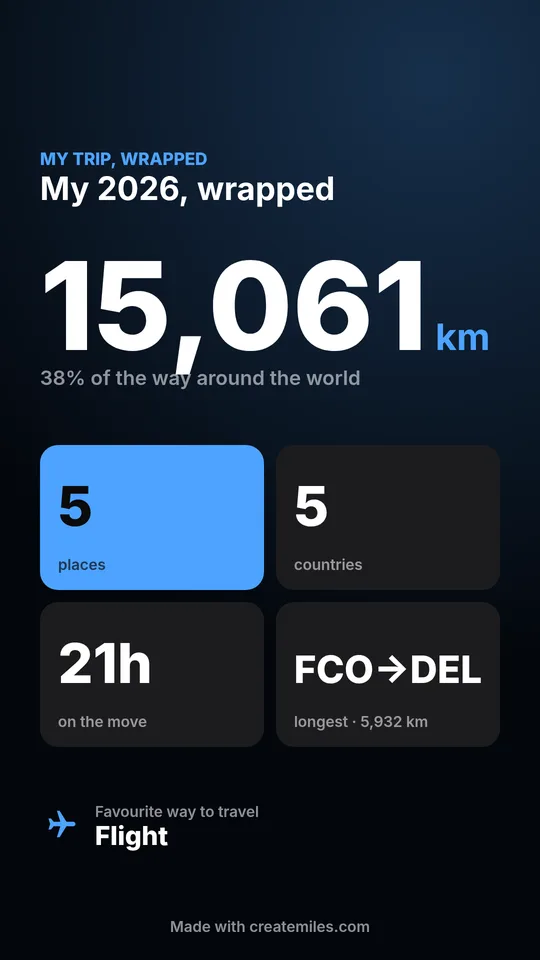
People love totals. How far did you go, how many countries, how many hours in the air? A handful of numbers on screen near the end gives the recap a payoff. Good ones:
- Total kilometres, and what share of the way around the world that is (the Earth is about 40,075 km around)
- Countries and cities, each counted once (if transits or day trips make that tricky, see how to count the countries you have visited)
- Days away, or hours on the move
- Your longest single journey
- How you mostly travelled: plane, train, car, bus or ferry
Working these out by hand is fiddly. Miles puts them on a “My trip, wrapped” card when it makes your video, which you can drop straight into the edit as the numbers beat. For more on how distances are counted, see how far have I flown.
5. The end card
End on something that holds still for two or three seconds: the last frame of the map with the whole route visible, a globe poster, or a quiet final clip. It gives people time to read, and a reason to watch again.
Using the template for a whole year
The same five beats work for a year of trips: make the route map the centrepiece and give each trip one clip instead of each city. Ten trips at 2 seconds each, plus a 10 second map, is already a 30 second video. For the stats side of a year in travel, see what is a Travel Wrapped, or make one at createmiles.com/wrapped.
Travel recap vs Travel Wrapped
They overlap, but they are not the same thing. A travel recap is an edited video: your clips, your music, your story, with a map as one part of it. A Travel Wrapped is a set of stats in the style of Spotify Wrapped, on a card and a map video, that you can post as it is without editing anything.
Many people do both: the Wrapped card as a Story, the recap as a Reel. If you only have ten minutes, make the Wrapped. If you have an evening and a lot of footage, make the recap and use the Wrapped card as its numbers beat. There is more on the format in what is a Travel Wrapped, and you can make one at createmiles.com/wrapped.
When to post a travel recap
- For a single trip: within a week of getting home. People still remember you were away, and your Stories from the trip have set it up.
- For a year in travel: in December, when everyone is posting their Wrapped and looking back. The last week of the year and the first days of January both work.
- For an anniversary: a year after a big trip, a recap with “one year ago today” is a natural repost.
Small things that make a recap better
- Cut on the beat. Pick the track first, then cut clips to it. The map video has no sound, so it fits under any song.
- Keep text short. Place names and one or two numbers. Long captions belong in the caption. For ideas, see travel captions for Instagram.
- Use one format throughout. Vertical 9:16 for Reels and Shorts. If you are making a longer YouTube recap, see the travel vlog map intro guide for the wide version.
- Check the watermark. The free version is 720p with a small watermark; a Trip Pass removes it for that trip. See pricing.